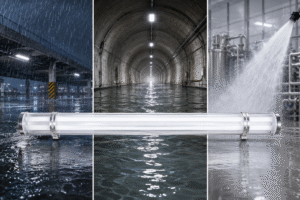
Modern LED lighting has become the standard choice for commercial, industrial, and architectural projects thanks to its high efficiency, long lifespan, and flexible lighting control. Compared with fluorescent or HID lighting, LED luminaires consume less energy, require less maintenance, and offer greater freedom in optical and fixture design.
However, one issue continues to concern lighting designers, electrical contractors, facility managers, and procurement teams alike—LED flicker.
A lighting contractor recently told us that a newly installed office lighting project looked perfectly fine during commissioning. However, once employees started using smartphones to record videos, noticeable flickering appeared on camera. The luminaires passed basic functional tests, yet the project still required costly troubleshooting.
LED flicker is often misunderstood. It is not always caused by poor-quality LEDs. In many cases, the driver, dimming system, electrical installation, or incompatible components are responsible.
For commercial lighting projects, flicker is more than just a visual annoyance. It can affect employee comfort, reduce camera image quality, interfere with machine vision systems, and even lead to project delays when lighting fails to meet client expectations after installation.
The good news is that most flicker problems can be identified—and prevented—before a project is completed.
In this guide, you’ll learn:
- What LED flicker actually is
- The most common causes of LED flicker
- How to diagnose flicker efficiently
- How buyers can reduce flicker risks before procurement
Whether you’re specifying luminaires for an office, retail store, warehouse, hospital, or industrial facility, understanding these principles will help you select more reliable lighting systems and avoid unnecessary troubleshooting costs.
What Is LED Flicker?
Many people think LED flicker means that an LED is repeatedly turning completely on and off. In reality, that’s only part of the story.
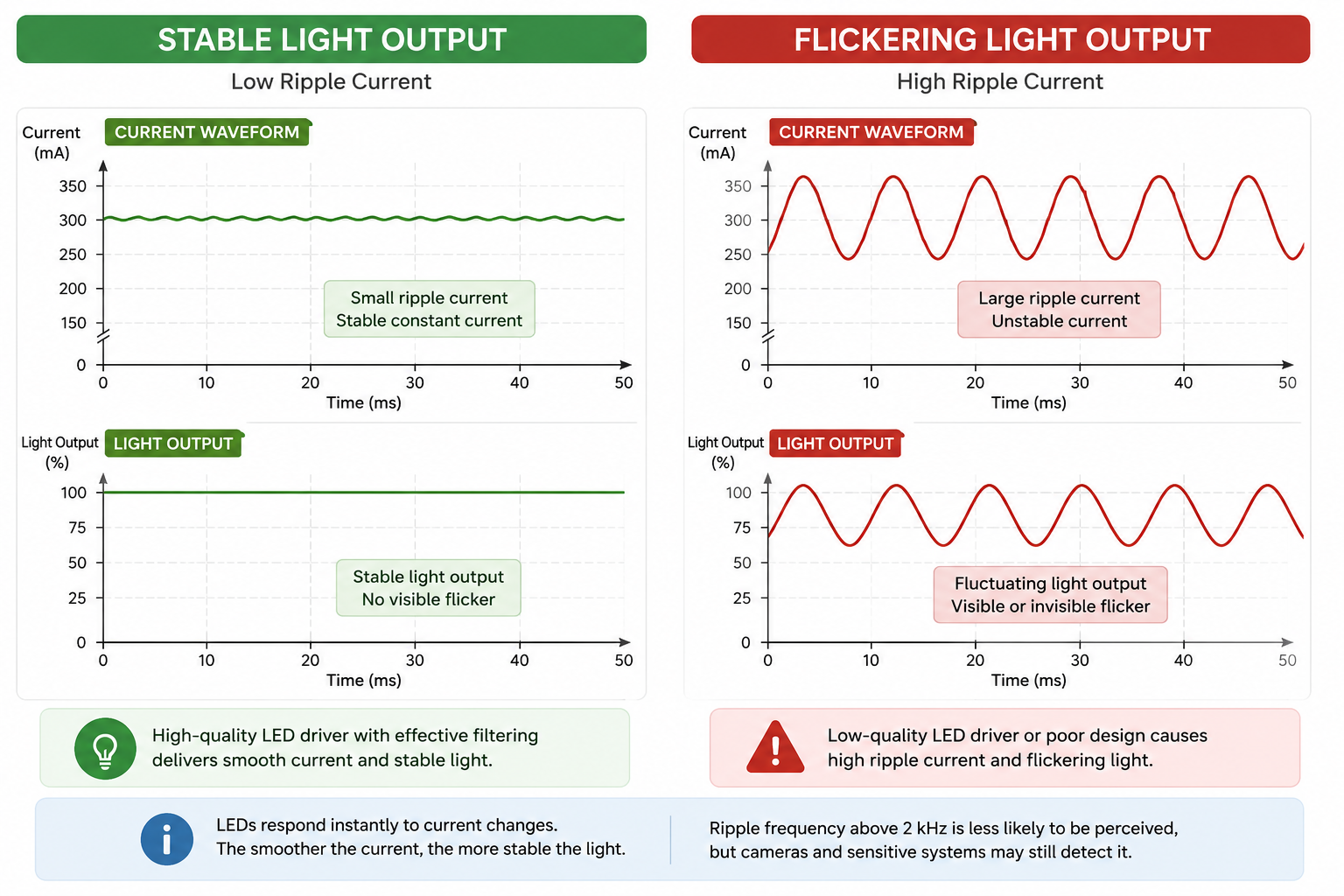
LED flicker refers to rapid fluctuations in light output over time, a phenomenon technically known as Light Output Modulation (LOM). Instead of producing perfectly constant illumination, the brightness continuously rises and falls at a certain frequency.
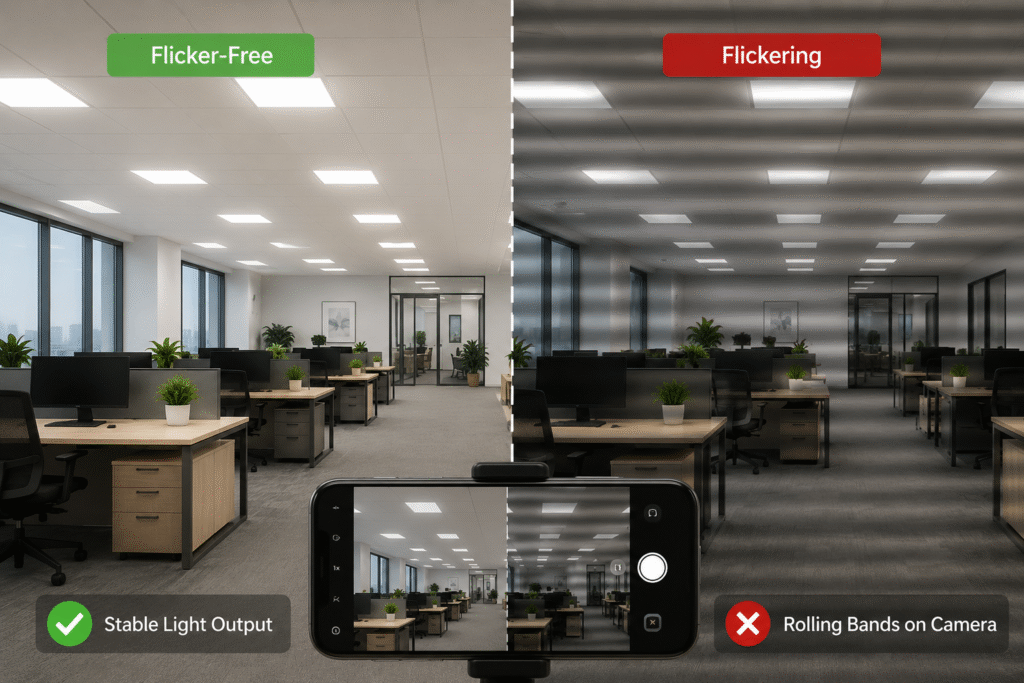
Sometimes these fluctuations are obvious. In other cases, they occur so quickly that the human eye cannot perceive them, even though cameras and sensitive electronic equipment can still detect them.
This is why lighting engineers evaluate flicker based on light output stability, not simply on whether people can see the light flashing.
Generally speaking, LED flicker can be divided into two categories.
Visible Flicker
Visible flicker occurs when brightness changes are slow enough—or large enough—for people to notice.
Typical symptoms include:
- Lights visibly pulsing
- Flashing during dimming
- Brightness changing repeatedly after switching on
- Random flickering caused by unstable power
Visible flicker usually indicates a problem that requires immediate investigation, such as an incompatible dimmer, a faulty driver, or poor electrical connections.
Invisible Flicker
Invisible flicker is much more common in modern LED lighting systems.
Although occupants perceive the lighting as stable, the light output is still fluctuating at a high frequency.
This becomes noticeable when:
- Recording videos with a smartphone
- Using security cameras
- Operating machine vision systems
- Running barcode scanners
- Performing high-speed photography
This explains why a lighting installation may appear perfectly normal until someone records a video and notices dark moving bands across the screen.
For commercial applications, invisible flicker is often more important than visible flicker because it directly affects imaging systems and visual comfort.
Understanding Common Flicker Metrics
Because flicker is not always visible, lighting professionals use standardized metrics to evaluate light stability.
Flicker Percentage (Modulation Depth)
Flicker Percentage measures how much the light output varies during one operating cycle. Lower values generally indicate more stable illumination.
Flicker Frequency
Measured in Hertz (Hz), flicker frequency indicates how many times the light output changes every second. Higher frequencies are generally less noticeable to people, although they may still affect cameras.
Flicker Index
Unlike Flicker Percentage, Flicker Index evaluates the entire waveform, providing a more complete representation of how the light output changes over time.
In recent years, additional metrics such as PstLM (Short-Term Light Modulation) and SVM (Stroboscopic Visibility Measure) have become increasingly important for evaluating visual comfort in commercial lighting projects. These metrics are referenced in international lighting standards and will be discussed later in this article.
What Causes LED Lights to Flicker?
One of the biggest misconceptions about LED lighting is that flicker is caused by poor-quality LED chips.
In reality, this is rarely true.
LEDs respond almost instantly to changes in electrical current. If the current supplied by the driver is stable, the light output remains stable. If the current fluctuates—even slightly—the LEDs immediately reproduce those fluctuations as changes in brightness.
In other words, LEDs don’t create flicker—they simply respond to the electrical power they receive.
For this reason, most flicker originates from the lighting system rather than the LED package itself.
The most common causes include:
- Poor LED driver design
- Incompatible dimming systems
- Power supply fluctuations
- Loose or incorrect wiring
- Low-quality electronic components
- Improper installation
- Driver aging over time
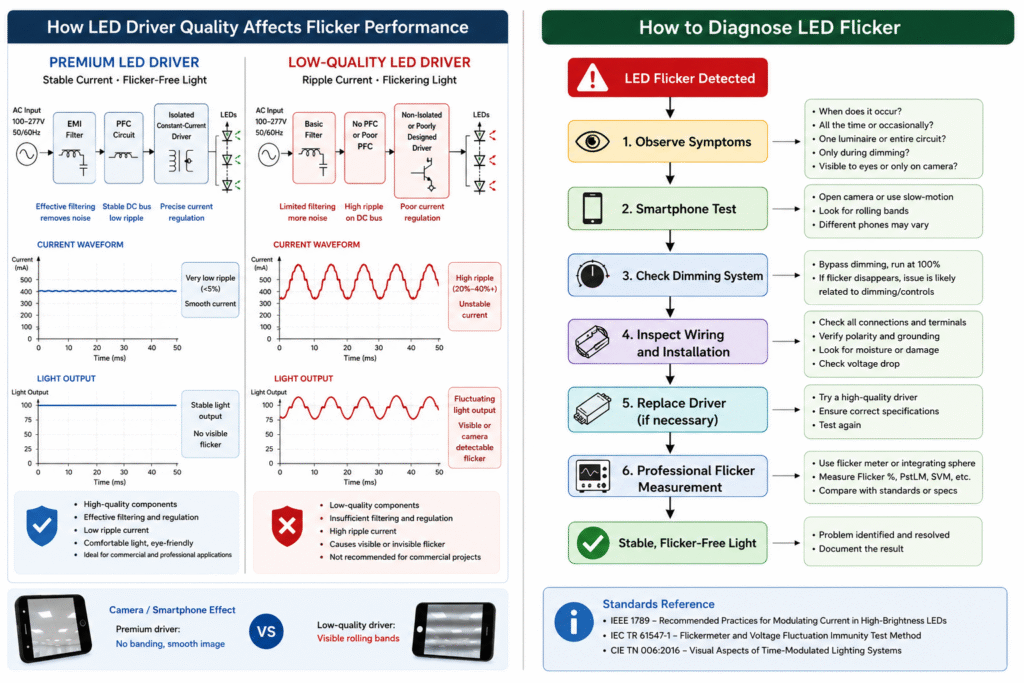
Among these factors, the LED driver is usually the single most important contributor to flicker performance.
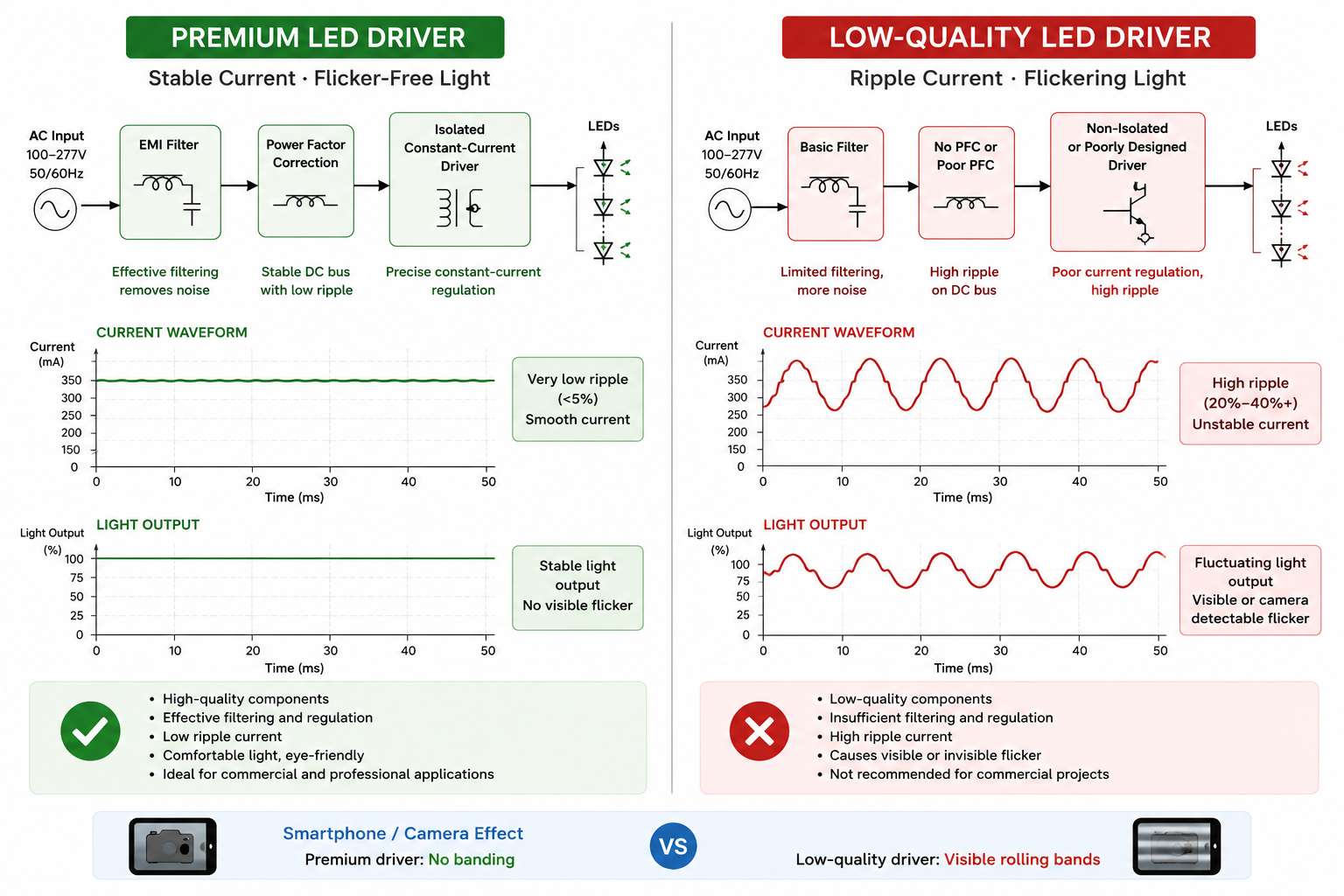
A well-designed constant-current driver smooths fluctuations from the AC power supply and delivers stable current to the LEDs. A lower-quality driver may allow ripple current to pass directly to the LED board, producing visible or invisible flicker—even when premium LED chips are used.
This explains why two luminaires equipped with the same LED chips can perform completely differently in real-world applications.
Professional lighting engineers therefore evaluate the luminaire as a complete electrical system rather than focusing solely on the LED brand.
Common Causes of LED Flicker
LED flicker rarely has a single cause. In commercial lighting projects, it is often the result of several factors working together, including the driver, dimming controls, power quality, and installation practices.
Understanding these causes can significantly reduce troubleshooting time and help buyers make more informed purchasing decisions.
1. Poor LED Driver Design
If LED chips are the “engine” of a luminaire, the LED driver is its power management system. It converts incoming AC power into the stable DC current required by LEDs. When the driver cannot regulate current effectively, fluctuations are transferred directly to the LEDs, causing visible or invisible flicker.
A high-quality constant-current driver includes filtering components that smooth the ripple from the AC mains before delivering power to the LEDs. Lower-cost drivers often simplify this circuitry to reduce manufacturing costs, which may increase current ripple and reduce light stability.
This is one of the reasons why two luminaires using the same LED chips can produce completely different flicker performance.
For commercial projects, specifying a reputable driver brand and verifying flicker test data is often more important than focusing solely on the LED package.
2. Incompatible Dimming Systems
Dimming compatibility is another common source of flicker, particularly in retrofit projects.
Modern LED luminaires may support different dimming protocols, including:
- TRIAC (Phase-cut)
- 0–10V
- DALI / DALI-2
- PWM-based dimming
Each protocol controls the driver differently. When a driver is paired with an incompatible dimmer, the result may be unstable current regulation, especially at low brightness levels.
For example, connecting a luminaire designed for 0–10V dimming to a TRIAC dimmer can cause intermittent flicker, poor dimming performance, or even prevent the luminaire from dimming properly.
Likewise, not every DALI controller is fully compatible with every DALI driver. Firmware versions, configuration settings, and control system integration can all influence performance.
Before installation, always verify that the luminaire, driver, and control system are designed to work together.
3. Power Supply Fluctuations
Even a well-designed luminaire can flicker if the incoming power supply is unstable.
Voltage fluctuations may occur in:
- Industrial facilities with heavy machinery
- Construction sites using generators
- Rural areas with unstable utility power
- Long cable runs with excessive voltage drop
When input voltage varies significantly, the driver must compensate continuously. High-quality drivers usually maintain stable output over a wide voltage range, while lower-cost drivers may allow these fluctuations to affect the LEDs directly.
If flicker occurs only at certain times of the day or only when large equipment starts operating, the electrical supply should be investigated before replacing luminaires.
4. Loose Wiring or Poor Electrical Connections
Not every flicker problem originates inside the luminaire.
Loose terminals, damaged connectors, poor grounding, or incorrect wiring can interrupt the electrical supply momentarily, causing intermittent flicker that may appear randomly throughout the day.
Common installation-related issues include:
- Loose terminal screws
- Poorly crimped connectors
- Damaged cables
- Incorrect polarity on control wiring
- Shared neutral problems
- Moisture entering outdoor junction boxes
Because these faults are often intermittent, they can be difficult to reproduce during commissioning. Inspecting the wiring should always be one of the first troubleshooting steps before replacing components.
5. Driver Aging and Low-Quality Components
LED chips generally maintain their performance for many years. Drivers, however, often determine the actual service life of the luminaire.
Electrolytic capacitors gradually age due to heat and operating time. As their capacitance decreases, ripple filtering becomes less effective, increasing the likelihood of flicker.
This is why some luminaires begin flickering after several years of operation even though the LEDs continue to function normally.
For long-term commercial projects, driver reliability should be evaluated alongside lumen maintenance and warranty coverage.
6. Low PWM Frequency
Many dimmable LED drivers regulate brightness using Pulse Width Modulation (PWM).
PWM rapidly switches the LEDs on and off while varying the proportion of “on” time to achieve different brightness levels. When implemented at sufficiently high frequencies, the switching is generally imperceptible.
However, if the PWM frequency is too low, flicker may become visible or produce rolling bands when recorded by smartphones or professional cameras.
This issue is particularly important for:
- Television studios
- Retail stores producing promotional videos
- Museums
- Broadcasting environments
- Live-streaming applications
Some premium drivers instead use high-frequency PWM or constant-current reduction (CCR) techniques to minimize visible flicker while maintaining smooth dimming performance.
| Cause | Typical Symptoms | Recommended Solution |
|---|---|---|
| Poor LED driver | Visible or invisible flicker | Use a high-quality constant-current driver |
| Incompatible dimmer | Flicker during dimming | Match the dimmer with the driver |
| Power supply fluctuations | Random flickering | Check input voltage and power quality |
| Loose wiring | Intermittent flicker | Inspect all electrical connections |
| Driver aging | Flicker after years of operation | Replace the driver |
| Low PWM frequency | Camera banding or visible flicker | Use high-frequency PWM or CCR dimming |
How to Diagnose LED Flicker
Diagnosing LED flicker is not always as straightforward as replacing a luminaire or changing the driver. Since flicker can originate from the driver, dimming controls, power supply, or installation, a systematic troubleshooting process is far more effective than trial and error.
The following steps are commonly used by lighting professionals to identify the source of flicker.
Step 1. Observe When the Flicker Occurs
Start by identifying the conditions under which flicker appears.
Ask questions such as:
- Does the flicker occur continuously or only occasionally?
- Does it happen only when dimming?
- Is it limited to one luminaire or an entire circuit?
- Does it occur after nearby equipment starts operating?
These observations often narrow down the possible causes before any measurements are taken.
Step 2. Use a Smartphone Camera
Although a smartphone cannot accurately measure flicker performance, it can be a useful screening tool.
Open the camera or switch to slow-motion recording and point it toward the luminaire.
If rolling dark bands or moving stripes appear on the screen, the light output is likely fluctuating at a frequency detectable by the camera.
Keep in mind that different smartphone models use different camera sensors and shutter speeds. Therefore, this method should be treated as an initial indication rather than a definitive test.
Step 3. Check the Dimming System
If the luminaire is dimmable, temporarily bypass the dimming controls and operate it at full output.
If the flicker disappears, the problem may be related to:
- An incompatible dimmer
- Incorrect dimming configuration
- Poor control wiring
- Low-end dimming instability
This simple step can quickly distinguish between driver issues and control system issues.
Step 4. Inspect the Electrical Installation
Before replacing expensive components, inspect the installation itself.
Check for:
- Loose terminals
- Damaged cables
- Incorrect wiring
- Poor grounding
- Moisture inside junction boxes
- Excessive voltage drop on long cable runs
Many intermittent flicker problems originate from installation defects rather than the luminaire itself.
Step 5. Use Professional Flicker Measurement Equipment
For commercial projects, laboratory testing remains the most reliable method.
Professional flicker meters and integrating sphere systems can measure:
- Flicker Percentage
- Flicker Index
- PstLM
- SVM
- Ripple waveform
- Flicker frequency
These measurements provide objective data that can be compared against project specifications and international standards.
Why Flicker Matters in Commercial Applications
For residential lighting, occasional flicker may simply be an annoyance. In commercial environments, however, unstable lighting can affect productivity, equipment performance, and customer experience.
Offices
Even when flicker is not consciously perceived, unstable light output may contribute to visual discomfort during long working hours.
Retail Stores
Many retailers now create promotional videos or livestream product demonstrations. Flickering lighting can produce rolling bands that reduce video quality and affect brand presentation.
Hospitals
Healthcare environments require stable illumination for accurate observation, examinations, and long periods of visual concentration.
Manufacturing Facilities
Machine vision systems and automated inspection equipment depend on consistent illumination. Flicker can reduce image accuracy and interfere with quality control processes.
Schools
Stable lighting creates a more comfortable visual environment for students and teachers during extended periods of reading and learning.
These examples demonstrate that flicker is no longer simply a lighting issue—it has become part of overall building performance.
Procurement Tips: How to Reduce Flicker Risks Before Purchasing
Many flicker problems can be avoided long before installation.
When evaluating commercial LED luminaires, buyers should look beyond lumen output, efficacy, and color temperature.
The following questions can help identify products that are more likely to deliver stable long-term performance.
LED Flicker Procurement Checklist
| Before Purchasing | Why It Matters |
|---|---|
| Request a flicker test report | Verify measured flicker performance |
| Confirm the driver brand | Driver quality largely determines flicker performance |
| Check dimming compatibility | Avoid incompatibility between drivers and controls |
| Review camera performance | Important for offices, retail, and broadcasting |
| Test a sample before mass production | Reduce commissioning risks |
| Review warranty and technical support | Ensure long-term reliability |
Frequently Asked Questions
Why do LED lights flicker when dimmed?
This is usually caused by an incompatible dimmer, an unsuitable driver, or instability at low dimming levels. Ensuring compatibility between the driver and dimming system often resolves the issue.
Can expensive LED chips still flicker?
Yes. Flicker is typically related to the driver and electrical system rather than the LED chips themselves.
How can I check for LED flicker without professional equipment?
A smartphone camera or slow-motion video can help identify obvious flicker or rolling bands, although professional instruments are required for accurate measurements.
Does flicker shorten LED lifespan?
Flicker itself does not normally damage LED chips. However, it may indicate driver problems or unstable power conditions that could affect the long-term reliability of the lighting system.
Which dimming system produces the least flicker?
There is no single best solution. Properly designed DALI, 0–10V, or PWM systems can all deliver excellent flicker performance when matched with compatible drivers.
Should I replace the LED module or the driver first?
In many cases, replacing the driver is more effective because it is often the primary source of flicker.
Conclusion
LED flicker is one of the most frequently misunderstood aspects of modern lighting. While many people assume the LEDs themselves are responsible, the real causes usually lie elsewhere.
In most commercial lighting projects, driver quality, dimming compatibility, power supply stability, and proper installation have a much greater influence on flicker performance than the LED chips themselves.
By understanding how flicker occurs, following a structured diagnostic process, and evaluating products carefully before procurement, designers and buyers can reduce project risks, improve visual comfort, and minimize costly troubleshooting after installation.
As LED lighting becomes increasingly integrated with smart controls, cameras, and automated systems, specifying flicker-controlled luminaires is no longer just a performance upgrade—it is becoming an essential requirement for modern commercial lighting projects.
References
- IEEE. IEEE Std 1789-2015: Recommended Practices for Modulating Current in High-Brightness LEDs for Mitigating Health Risks to Viewers.
- IEC. IEC TR 61547-1: Equipment for General Lighting Purposes – EMC Immunity Requirements – Objective Light Flickermeter and Voltage Fluctuation Immunity Test Method.
- DALI Alliance. DALI Technical Guides and Application Notes. https://www.dali-alliance.org
- NEMA. ANSI C137.1 – 0–10V Dimming Interface for LED Drivers, Fluorescent Ballasts, and Controls.
- ENERGY STAR. Program Requirements for Lamps and Luminaires.
- CIE. Visual Aspects of Time-Modulated Lighting Systems.